
Resolution in Dental 3D Printing – 4K, 8K, 12K?
 In dentistry, precision is paramount, whether for perfectly fitted prosthetics, diagnostic models, or tools supporting complex procedures. 3D printing has revolutionized this field by enabling the creation of highly accurate and personalized solutions. However, understanding the factors that impact print quality, particularly printer resolution, can be confusing.
In this article, we’ll explore how different resolution levels affect 3D printing outcomes. What does the “K” in 3D printing mean? Does a higher resolution always guarantee better results?
Understanding screen resolution: 4K, 8K, 12K
Think of watching a movie on your TV or computer. The image you see is made up of tiny dots called pixels. The more pixels a screen has, the clearer and more detailed the image becomes. Resolution tells us how many of these pixels are on the screen.
What does 4K, 8K, and 12K mean?
You often hear about resolutions labeled with “K,” such as 4K, 8K, and 12K. The “K” stands for “kilo,” meaning 1,000, and refers to the number of horizontal pixels (those lined up from left to right).
- 4K: Around 4,000 pixels (either 3,840 or 4,096, depending on the standard).
- 8K: Approximately 8,000 pixels (7,680 or 8,192 pixels).
- 12K: About 12,000 pixels (exactly 12,288 pixels).
How does it work in practice?
Imagine you drew an image filled with intricate details. With a lower pixel count, such as in 2K resolution, some of those details may be unclear or blurry. As you increase the pixel count (moving to 4K or 8K), the image becomes more detailed, and all elements become sharper.
How does resolution affect 3D Printing quality in Dentistry?
Resolution vs. Precision
While an 8K printer has more pixels than a 4K printer, it doesn’t necessarily mean 8K will always produce better prints. Print precision depends not only on the number of pixels but also on their size and spacing (pixel density). Smaller, closely packed pixels produce more detailed prints, but if the pixels are large, even an 8K printer may not deliver superior results.
Size matters
The “K” classification doesn’t account for the screen size. If two printers both have 4K resolution, but one has a smaller screen, its pixels will be more densely packed, potentially resulting in a more precise print than the larger screen, despite both having the same number of pixels.
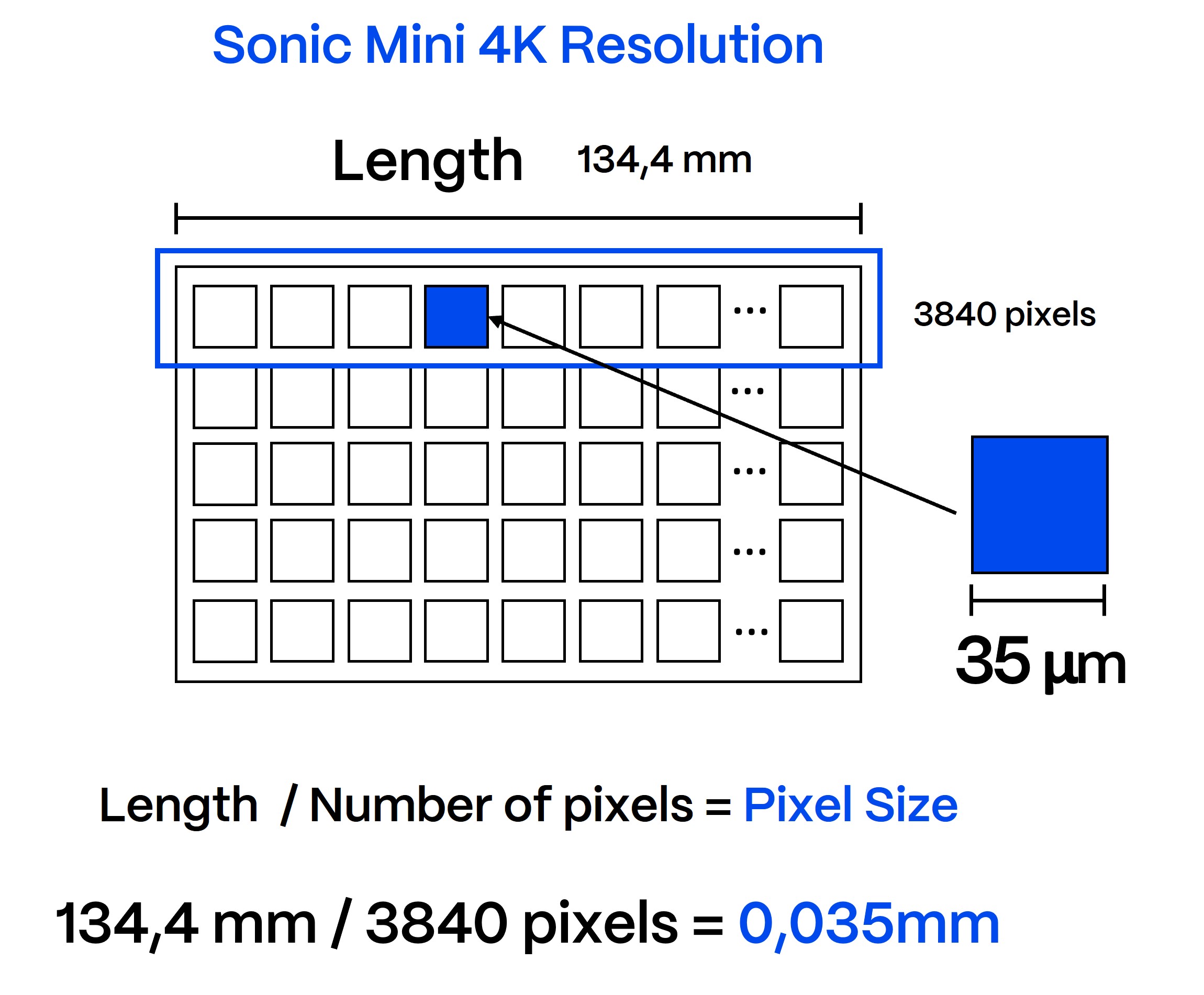
Example: Let’s compare two 4K resolution printers. One has a 6.1-inch screen (e.g., Phrozen Sonic Mini 4K) with pixel sizes of approximately 0.035 mm (35 microns). On the other hand, a larger 8.9-inch screen (e.g., Anycubic Photon Mono X) with the same 4K resolution has larger pixels—around 0.05 mm (50 microns).
Pixel Density
The standard way to measure LCD displays is by their diagonal size, usually expressed in inches. This applies to 3D printing as well. For example, the Phrozen Sonic Mini 4K has a 6.1-inch screen. Here, we need to recall the Pythagorean theorem learned in school, which states that the sum of the squares of the two shorter sides of a right triangle equals the square of the hypotenuse… but let’s skip the math. According to the manufacturer’s data, the longer side of the screen is 134.4 mm, or approximately 5.29 inches.

Pixel density (PPI, or pixels per inch) can be calculated by dividing the resolution by the width (or height) of the screen in inches.
Using the same calculation method for the Anycubic Mono X:
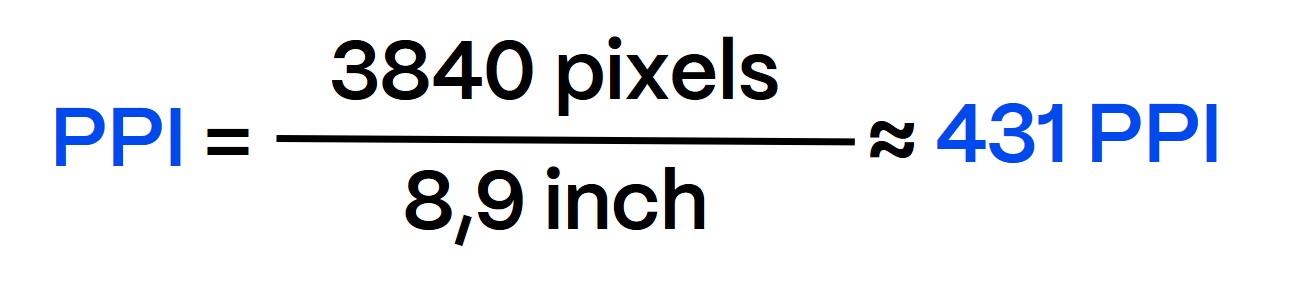
These examples demonstrate that pixel size and density significantly affect print quality, and printers with the same nominal resolution (e.g., 4K) can produce vastly different results depending on these factors. Therefore, when evaluating a printer, it’s essential to consider both pixel size and density, not just the “K” count, as they directly impact precision in dental applications.
What are 4K and 8K resins?
As 4K and 8K printers have emerged, so have resins marketed as “4K” or “8K.” According to Phrozen, their Aqua 4K Resin is designed for high-resolution 3D printing and works best with Sonic Mini 4K and Sonic Mighty 4K printers. Phrozen claims that this resin produces highly detailed 3D models when paired with these printers.
As resin creators and manufacturers, we understand the benefits of optimizing resin for specific printer models. Print quality depends on the printer’s capabilities (such as screen resolution and light source) and the correct printing settings. A well-matched resin can yield excellent results regardless of the “K” in its name, making terms like “4K resin” or “8K resin” more of a marketing label than a technical one.
Printing with “8K” resin on a 4K printer won’t necessarily improve the accuracy, quality, or aesthetics of the print. Moreover, using “4K” resin on a different 4K printer does not guarantee that the print will achieve true 4K resolution.


Przemysław Grabowski
Challenges of 3D printing in low-temperature environments
When winter does not let up and temperatures drop not only outdoors, problems with 3D [...]

Kacper Włodarek
Dental 3D Printing: Accuracy vs. Resolution
When it comes to 3D printing applications in dentistry, accuracy is everything. It ensures that [...]

Kacper Włodarek
Choosing the Best Dental 3D Printer Technology: SLA, DLP, or LCD?
The world of dental technology is evolving rapidly, with 3D printing now a key part [...]
